
Pricing
Pricing built around the work,not the call.
Rooms stay open between sessions on every plan. What changes is how many people you can bring into one, how far you can broadcast it, and how deeply it plugs into your pipeline.
Starter
For small reviews and getting started at no cost.
FreeFree
no card requiredno card required
Includes
- Up to 6 people per room
- Unlimited persistent rooms
- Unlimited meeting length, no daily cap
- Chat and control panel
Studio
For creators and media teams who deliver on a schedule.
CustomCustom
priced with our sales teampriced with our sales team
Everything in Collaborator, plus
- Up to 100 people per room
- Live streaming to any destination
- Inbound and outbound feeds
- NDI integration
- Adobe and Avid plugins
In every plan, on every tier

Unlimited persistent rooms
Rooms stay open between sessions. Nothing to re-share, nothing to re-upload.

Native 4K, never downgraded
Every stream holds its original resolution all the way through review.

Up to 16 streams on screen
Compare cuts, angles and versions side by side without leaving the room.

Runs in the browser
Guests join without a download. The desktop app is optional.
Enterprise-grade security on every tier. Every media byte encrypted, every request authenticated. Read the security overview
Compare every plan
The differences are in how many people join, what you can record and brand, and how far the room plugs into your pipeline.
| Starter | Collaborator | Studio |
|---|---|---|
| Rooms and collaboration | ||
| Room occupancy | ||
| 6 people | 50 people | 100 people |
| Unlimited persistent rooms | ||
| Starter: included | Collaborator: included | Studio: included |
| Meeting duration | ||
| Unlimited | Unlimited | Unlimited |
| Meetings per day | ||
| Unlimited | Unlimited | Unlimited |
| Chat | ||
| Starter: included | Collaborator: included | Studio: included |
| Control panel | ||
| Starter: included | Collaborator: included | Studio: included |
| Media annotations | ||
| Starter: not included | Collaborator: included | Studio: included |
| Custom branding | ||
| Starter: not included | Collaborator: included | Studio: included |
| Playlists | ||
| Starter: not included | Collaborator: included | Studio: included |
| Media and recording | ||
| Grid and ISO recording | ||
| Starter: not included | Collaborator: included | Studio: included |
| Supported formats play natively | ||
| Starter: not included | Collaborator: included | Studio: included |
| Apple TV app | ||
| Starter: not included | Collaborator: included | Studio: included |
| Broadcast and integration | ||
| Live streaming | ||
| Starter: not included | Collaborator: not included | Studio: included |
| Inbound and outbound feeds | ||
| Starter: not included | Collaborator: not included | Studio: included |
| NDI integration | ||
| Starter: not included | Collaborator: not included | Studio: included |
| Adobe and Avid plugins | ||
| Starter: not included | Collaborator: not included | Studio: included |
Do I pay per user or per room?
Per user. Rooms are unlimited on every plan, so you are never charged for leaving a project open between sessions.
What happens when a room hits its occupancy limit?
The next person sees a full-room notice rather than being dropped into a degraded session. You can raise the ceiling at any time and the change applies immediately.
Who can upload files to a room?
The host and any co-hosts. Co-hosts are people with a Coresee account whom the host promotes, and a room can have as many as you need. Guests who join without an account cannot upload.
Is there a free trial?
Starter is free and needs no card, so you can use Coresee without a trial at all — signing up puts you there. Collaborator and Studio are priced with our sales team.
What stays in a room between sessions?
Everything. Uploaded files, recordings, chat history, the participant list and roles, and the room's branding and settings are all kept until you delete the room. Deleting a room removes its contents permanently.
Which file formats can I present in a room?
Video (.mp4, .mov), PDFs, images (.jpeg, .png, .svg and .webp) and audio (.mp3) present natively in the room, with no screen share. Other files — .docx, .pptx, .mkv, .csv, .xlsx and the rest — can still be uploaded, stored and downloaded from the Files tab; they just cannot be put on screen.
Do guests need an account?
No. Anyone with the room link can join from the browser without an account, unless the host has turned on Login Required or made the room private. Guests can be made presenters, but cannot upload or download files or become co-hosts.
Two numbers set the price
How many people watch at once, and how long you are on air. Nothing else moves the number.
Pay per event
$600
One event at 1,000 concurrent viewers over 3 hours, at $0.20 per viewer per hour.
$0.20 per concurrent viewer per hour, $20 minimum. Billed once, after the event. No subscription and no seats.
Get an exact quoteHow event pricing works
Two numbers
How many people watch at once, and how long you are on air. At $0.20 per concurrent viewer per hour, those two numbers are the whole price. There is no seat count and no platform fee underneath.
Bring your source
Connect any professional camera, streaming software, or a live Coresee Room as your broadcast source over RTMP.
One invoice, after
You are billed once, after the event has run. No subscription, no seats, and nothing metered in the background.
In every event, at every size
- Branded lobby, stage and player
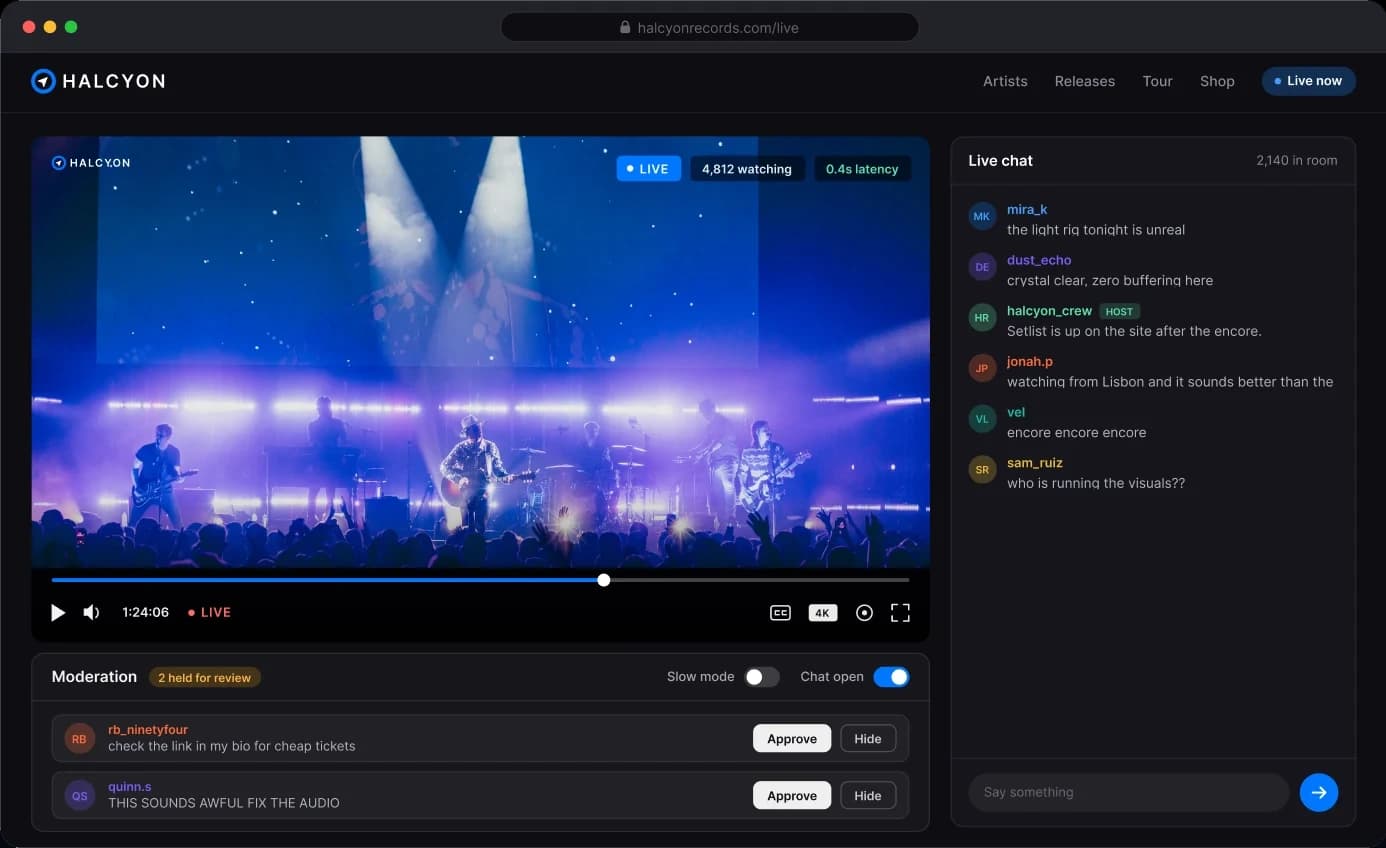
- Live chat and moderated Q&A
- Attendance and engagement report
- Embedded on your own site
- Any camera or streaming software over RTMP
- Encrypted delivery, end to end
Questions,answered
Planning something unusual? A producer will scope it with you before you commit.
Talk to a producerHow is the price calculated?
$0.20 per concurrent viewer per hour. Those two numbers are the whole calculation: nothing else moves it, and nothing is metered in the background.
What if more people show up than expected?
The stream is not cut off. The rate is flat per concurrent viewer per hour, so a larger audience is a larger number on the same invoice rather than a penalty band you fall into.
Do I need a Rooms subscription to run an event?
No. Events are booked and paid for one at a time, with no subscription and no seats.
When am I billed?
Once, after the event has run. Planning something unusual? A producer will scope it with you before you commit.
Can I gate an event?
Every event collects attendee names and email addresses in the lobby before the broadcast starts. Anything beyond that is scoped with your producer before the event.
What do I get when the event ends?
A branded closing screen automatically replaces the stream, so there is no abrupt cut, and you can download the full attendee report: names, emails, join and leave times, and the complete chat history.


See Coresee in your workflow